

Want to start an online store but not sure what should come first: the product, platform, or supplier?
Start with the business decisions, not the website.
Before the store builder becomes useful, you need to know what you want to sell, who it's for, and how the order will reach the customer.
This guide walks through that process in ten steps, with platform trade-offs and checks before live orders.
It focuses mainly on physical-product stores, so the supplier and fulfillment steps will look different if you're selling digital downloads or services.
Key takeaways
- Validate before you build: Check the customer and demand, then compare competition and rough margins before spending much time on the storefront.
- Your fulfillment model changes the business: Dropshipping and print on demand reduce inventory commitment, while buying stock gives you more control but requires more money and operations.
- There's no universal best ecommerce platform: Choose based on the control and ease of use you need, plus integrations and cost.
- Don't launch an untested checkout: Check payments and shipping rates first. Review emails, taxes, and policies before asking customers to use the full order flow.
- Start marketing with a reason: Pick one main channel that fits the customer and product, then decide what result would make you continue or change the test.
Let's get started!

Start your store on Shopify
Free 3-day trial + $1/month for 3 months
- Grows with you from first test product to full brand
- Thousands of apps and hundreds of themes to customize your store
- Beginner-friendly editor with pro features when you're ready
No card to start. Cancel anytime.
How to start an online store in 10 steps
Here is the full process:
- Decide what you want to sell and who it's for
- Check demand, competition, and the rough numbers
- Choose a fulfillment method
- Choose your store structure
- Pick an ecommerce platform that fits
- Find and check your supplier or product source
- Check the business, tax, and product rules that apply to you
- Build the store and product pages
- Set up payments and shipping, add your policies, then place a test order
- Choose a marketing channel and run a measured first test
You don't have to complete every step in one weekend.
If the research shows that the product, budget, or business model doesn't make sense for you, stopping before launch saves you from spending more on a weak plan.
1. Decide what you want to sell and who it's for
A store builder gives you a checkout, but it can't decide why someone should buy from you.
Start with the customer and the product idea. You don't need a perfect buyer persona yet, but you should be able to explain who you're trying to help and what you plan to sell them.
For example, "fitness products" is broad. "Compact recovery tools for people who train at home" gives you a clearer starting point for products, content, and marketing.
Ask yourself:
- Who is most likely to want this product?
- What problem, goal, or interest makes the product relevant to them?
- Where do these people already look for products or information?
- What would make your offer useful or different enough to consider?
Our guide to defining a target audience helps you turn a broad idea into something more specific.
Still deciding what to sell?
Use our guide to choosing a product as a research framework.
The same checks around demand and margins are useful even if you plan to hold inventory yourself. Shipping and product risk still matter too.
2. Check demand, competition, and the rough numbers
Before paying for a theme or a stack of apps, look for evidence that the idea deserves a store.
You're not trying to prove that a product will succeed. You're trying to reduce obvious uncertainty before you spend more.
Start with three questions:
- Demand. Are people searching for or buying similar products? Are they discussing or advertising them?
- Competition. What alternatives does the customer already have, and what would make your offer worth considering?
- Economics. Is there enough room between your realistic selling price and your costs?
Don't stop at the supplier price when estimating the economics. Include shipping and payment fees, plus refunds, marketing costs, and any apps or taxes that apply.
If the product only looks profitable when you ignore several real costs, building the store will not fix that.
Use our dropshipping pricing guide and profit margin guide to work through the numbers.
3. Choose a fulfillment method
Next, decide who will hold the product and who will ship each order.
This choice affects how much money you need upfront and how much control you have over the customer experience:
| Fulfillment method | How it works | Main advantage | Main trade-off |
| Dropshipping | A supplier holds the stock and ships each customer order for you | Little inventory commitment upfront | Less control over stock, packaging, and fulfillment |
| Print on demand | A provider produces your design after the customer orders | Sell custom designs without holding finished stock | Margins, quality, and fulfillment depend heavily on the provider |
| Hold and ship stock yourself | You buy inventory and handle packing and shipping | More control over the product and fulfillment | Requires inventory money, space, and operational work |
| Buy stock and use a 3PL | You own the inventory and a logistics company stores and ships it | Outsources much of the fulfillment work | You still commit to stock and pay fulfillment/storage fees |
Dropshipping
With dropshipping, you sell the product without keeping it in your own inventory.
When a customer orders, you pay the supplier to fulfill that order and ship it to the customer.

The inventory commitment is lower, but you give up some control over supplier checks and shipping expectations. A cash buffer matters too.
Dropshipping still isn't a $0 business because you have to pay for the product and shipping when an order is fulfilled.
Print on demand
Print on demand is similar because you don't normally hold the finished inventory yourself.
The difference is that the provider makes or prints the product after an order, using your design.
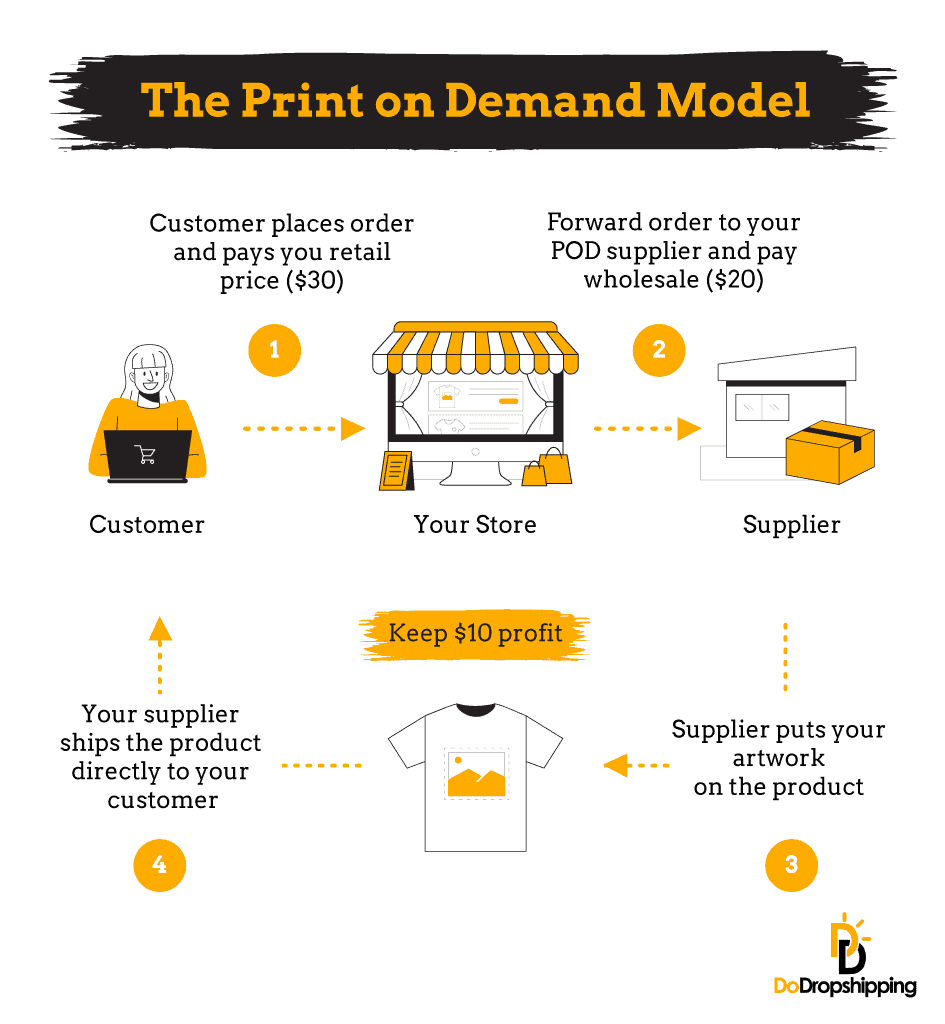
This fits creators and brands with strong design ideas, but you still depend on the provider for product quality and fulfillment.
If these two models are your main options, compare dropshipping vs. print on demand before choosing.
Holding your own inventory
Buying stock gives you more control over what you ship and how you pack it.
The catch is the inventory commitment because you pay for products before you know exactly how quickly they will sell.
Pack orders yourself or send the stock to a third-party logistics company (3PL). A 3PL reduces the day-to-day fulfillment work but adds storage and fulfillment costs.
4. Choose your store structure
If you're selling physical products, decide how broad the catalog should be.
For this guide, we'll use three simple store structures: general, niche, and one-product:
| Store type | What it looks like | Best fit when... | Watch out for... |
| General store | Products across several unrelated or loosely related categories | You want flexibility to test a broad catalog | A less focused audience makes branding and marketing harder |
| Niche store | Products built around one market or customer interest | You want a clearer audience and room for related products | You have less freedom to move far outside the niche |
| One-product store | The store and offer are built around one main product | The product deserves a focused page and message | The store depends heavily on one product continuing to make sense |
There's no automatic winner here.
A niche store gives you a clearer path to coherent branding because the products and customer are related.
One-product stores fit when one offer deserves all the attention, while general stores give you more freedom to test. The trade-off is a broader catalog that makes the brand harder to understand.
Choose the structure that fits the products you have evidence for, rather than picking a format first and forcing products into it.
5. Pick an ecommerce platform that fits
Now the platform decision is much easier because you know what the store needs to do.
Start by deciding whether you want a hosted platform that handles most of the technical setup or more control through WordPress and your own hosting.
Then check the integrations you actually need. A supplier app, print on demand connection, or subscription feature quickly narrows the list.
Selling internationally? Check the platform's payment, currency, and tax tools before you build around it.
Those questions matter more than finding a platform somebody called "the best."
| Platform | Worth considering when... | Main trade-off to check |
| Shopify | You want a hosted ecommerce platform with a large app ecosystem and a relatively straightforward setup | The subscription and paid apps add to your monthly cost |
| WooCommerce | You already use WordPress or want more control over hosting, data, and customization | The plugin is free, but hosting and maintenance are still your responsibility. Paid extensions add cost |
| Wix or Squarespace | You want a visual site builder and your store doesn't need a complicated commerce setup | Check the exact ecommerce plan and integrations you need before building around the platform |
| BigCommerce | You want a hosted platform with more commerce features built in | Read the current plan, sales-volume and payment-provider rules carefully |
If Shopify fits your needs, check the current Shopify trial and introductory offer before budgeting, because offers vary by location.
For a wider comparison, use our guide to the best platforms for selling products online.
One practical rule: only add an app when you know exactly what problem it solves for your store.
6. Find and check your supplier or product source
Where your products come from depends on the fulfillment model you chose.
For dropshipping, you need a supplier that fulfills individual customer orders.
Print on demand needs a provider that produces your designs, while holding stock means buying inventory from a wholesaler, manufacturer, or other supplier before customer orders arrive.
Don't choose based on the lowest unit price alone.
Before relying on a supplier, check:
- Where the product ships from
- Realistic processing and delivery times
- Product quality and packaging
- Stock updates and order handling
- Return, refund, and damaged-order procedures
- How quickly the supplier answers useful questions
- Whether the supplier works with your ecommerce platform or workflow
If you can afford it, order a sample before taking customer orders because a catalog photo can't show you exactly what will arrive.
For dropshipping, start with our dropshipping supplier guide.
Browse our regional supplier lists for the US and Europe. We have separate guides for the UK, Canada, and Australia.
If you plan to use print on demand, compare the providers in our print on demand companies guide.
7. Check the business, tax, and product rules that apply to you
Before you take live orders, check what your country or region requires from an online seller.
The exact rules depend on where you operate and what you sell. Check registration and tax requirements, plus consumer and privacy rules.
Product requirements vary too. Supplements, cosmetics, children's products, and safety equipment need additional product-specific checks beyond the basics.
Check official government guidance for your location, and get qualified professional advice when the rules are unclear, or the risk is meaningful.
If you're using dropshipping, our dropshipping taxes guide and guide to where dropshipping is legal help you understand what questions to research next.
8. Build the store and product pages
With the business decisions in place, build a much more useful first version of the store.
You don't need a premium theme and ten paid apps to make the store credible.
Before you build around a brand, choose a store name that fits what you plan to sell and check whether a suitable domain is available.
Our guide to choosing a store name has more ideas if you're stuck.
Then start with the pages and information a shopper needs:
- A homepage that makes the offer clear
- Product pages with accurate images and descriptions
- Shipping information
- A return and refund policy
- Contact information
- Any legal or policy pages required for your setup
Your product page should answer the questions a serious customer needs answered before buying.
Explain what the product does and who it's for, then cover what is included and what the customer should expect from delivery.
Use your own copy instead of pasting a supplier description, and check every claim before publishing it.
Use these guides for product images, product descriptions, and store branding.
If you need examples, look at our ecommerce product page examples and Shopify homepage examples. Use them for ideas, not as templates to copy line for line.
Before moving on, check the main pages on both desktop and mobile. Make sure the storefront and checkout use a secure HTTPS connection too.
9. Set up payments and shipping, add your policies, then place a test order
This is when a draft store becomes ready to take an order.
Set up the payment methods available for your platform and business location, then check the fees and payout timing rather than choosing on popularity alone.
Payout timing becomes a cash-flow problem when the supplier needs payment before the customer's payout reaches your bank.
Then configure shipping around what you can realistically deliver, and don't promise a faster window than the fulfillment setup can support.
Before opening the store to customers, place a test order and work through the full experience:
- Add a product to the cart
- Check the shipping rate and tax behavior
- Confirm the storefront and checkout load securely over HTTPS
- Complete the checkout
- Review the confirmation page and emails
- Check that the order reaches the correct fulfillment workflow
- Test cancellation, refund, and customer-service steps where practical
If you're choosing between payment providers, our payment gateway guide explains the main factors to compare.
10. Choose a marketing channel and run a measured first test
Publishing the store doesn't automatically bring the right visitors, so you still need a plan for how early customers will find you.
The right starting channel depends on the product and audience, while your budget and the skills you're willing to learn matter too:
| Channel | Best fit when... | Main trade-off |
| Short-form social content | The product is visual or easy to demonstrate | Requires consistent content and produces less predictable results |
| SEO/content | Customers research questions or products before buying | Organic traffic takes time to build |
| Paid social ads | You have a clear product and audience, plus an offer and test budget | A poorly defined test burns budget quickly without teaching you much |
| Search ads | People already search with strong buying intent | Competitive categories push click costs up |
| You already have visitors, leads, or customers to communicate with | It's not a traffic source by itself when you have no audience yet |
Pick one main channel first instead of trying to be everywhere.
More importantly, decide what you're testing.
Maybe you want to learn whether the product gets qualified clicks, whether the product page converts those visitors, or whether the acquisition cost leaves enough margin.
Set a budget or time limit you can afford to lose, then decide what result would make you continue or change the test before it starts.
Use our dropshipping marketing guide to compare the main channels before choosing one.
How much does it cost to start an online store?
There's no useful single number for every online store because the fulfillment model changes the budget.
A dropshipping or print on demand store avoids buying a large batch of inventory upfront, while a store that holds stock needs more cash before the first order because you buy inventory first.
Whichever model you choose, build the budget around the costs that actually apply to you:
- Ecommerce platform or hosting
- Domain name
- Samples or initial inventory
- Supplier, fulfillment, or shipping costs
- Payment processing
- Business registration or tax setup where required
- Marketing
- A cash buffer for refunds, replacements, or payout delays
Do much of the research and planning before spending anything. Going live is different.
If your budget is currently $0, use our guide to what you can prepare before you have money to launch.
The article focuses on dropshipping, but the distinction between free preparation and live-store costs applies to other ecommerce models too.
For a fuller breakdown of the costs involved, see our guide to how much it costs to start an online store.
Is starting an online store right for you?
An online store lets you sell without opening a physical retail location, but that doesn't make it an automatic fit.
You still need to choose products and suppliers. Customer service, marketing, and the financial side matter too.
Some business models also put inventory or fulfillment work on you:
| A better fit if... | Wait or choose another path if... |
| You're willing to research products and customers before building | You need the business to produce immediate income |
| You can afford the costs of your chosen fulfillment model | Your plan depends on the first few sales paying the next expense |
| You're willing to learn marketing and customer service | You only want to build the website and avoid the operating side |
| You can test an idea without treating every test as a guarantee | You can't afford for the first product or marketing test to fail |
If the second column describes your situation today, research first because there's no advantage in opening checkout before the rest of the plan is ready.
Common mistakes to avoid before launch
A few mistakes show up repeatedly because they feel productive in the moment:
- Choosing the platform before the business model. That risks paying for a setup that doesn't fit the fulfillment or integrations you need.
- Buying premium extras before validating the idea. A better theme can't fix a product customers don't want.
- Relying on supplier claims without checking them. Verify shipping and order a sample when practical.
- Opening checkout before testing it yourself. A broken payment, shipping, or email flow is much easier to catch before a customer does.
- Trying several marketing channels at once. That spreads your budget and makes it harder to tell what actually drove the result.
- Treating persistence as the fix for a weak test. Continue when you have a specific reason to test again, not because you think stopping is automatically failure.
For a deeper look at the last point, read our guide to why dropshipping stores struggle and what to check next.
FAQs about starting an online store
How much does it cost to start an online store?
There's no single startup cost because your platform and fulfillment model change the budget. Start with the store or hosting and a domain, then add samples or inventory as needed, plus payment processing and fulfillment or shipping.
Include any business requirements, marketing costs, and cash buffer that apply to your setup.
If your budget is currently $0, see what you can prepare before you're ready to launch.
Which ecommerce platform should I use?
There's no universal best platform. Choose Shopify when you want a hosted ecommerce setup. Choose WooCommerce when you want more control through WordPress and your own hosting.
Wix, Squarespace and BigCommerce suit other combinations of design, hosting and commerce needs.
Compare the current options in our guide to the best platforms for selling products online before committing.
What products should I sell in my online store?
Look for a product that fits a clear customer and leaves room for your real costs. Check demand and competition first, then look at shipping, supplier options, and product risk before you build around the idea.
Our guide to choosing what to dropship gives you a practical research framework.
Do I need to register a business before selling online?
Registration and tax rules depend on your location and what you sell. Licensing, consumer protection, and product requirements also vary.
Check the official rules where you operate before taking live orders. Get qualified professional advice if the requirements are unclear for your situation.
Can I start an online store without holding inventory?
Yes. Dropshipping and print on demand let you sell without keeping finished products in your own inventory. A supplier or print provider fulfills the order after the customer buys.
That reduces inventory commitment, but you still need to check product quality and shipping. Margins and the provider you rely on matter too.
How do I price products for an online store?
Start with the costs that apply to the order, then check whether the selling price leaves enough room for the rest of the business. Product cost is only one part.
Add shipping and payment fees, then account for marketing and refunds. Add any platform costs and taxes that apply to your setup.
Use our pricing strategy guide to work through the numbers.
So, how should you start an online store?
Do the cheap research before the expensive commitments.
First decide what you want to sell and who should care about it, then check the numbers and fulfillment model before you commit to a platform or supplier.
Once those pieces make sense, build the simplest store that can handle the real customer journey and test the full flow before paying to send traffic to it.
Treat the first marketing effort as a test, not proof the business will work, then use the results to decide whether the next step deserves more time or money.
If you decide dropshipping is the fulfillment model you want to use, continue with our guide to starting a dropshipping business.







6 Comments
I understand to partner with a supplier for a new dropshipping store you need to create an online store first .
but how do you set up an online store with no product yet ?
Hi Michelle,
Great question! In almost all cases, you actually do not need to have a dropshipping store already to partner with a supplier. If you can check out the suppliers listed in step 5 of the article, you will see that you will be able to sign up and browse through their products without needing a store already 😊
I hope this answered your question, good luck!
– Patryk
hi Patrick can you clarify this section from your high ticket dropshipping page? ‘to find suppliers, you will have to contact various manufacturers by phone or by email and tell them that you would like to resell their products.
But before you start contacting those manufacturers, it’s important to have an online store running in the same niche already.
That’s because almost no manufacturer will start working with a dropshipper that doesn’t have a store yet. After all, that could be a risk for their reputation if they manufacture branded products or just a massive waste of time.’
Hi Michelle,
Of course! What I aimed to say is that many (local) manufacturers of high-ticket products don’t list their items on popular dropshipping supplier platforms like Spocket or BigBuy. Instead, many rely on a ‘reseller network’. These high-ticket product manufacturers have connections with a number of partners/resellers, who have the exclusive right to resell their products through their own websites.
If you see an opportunity to resell high-ticket products from a certain manufacturer, you could try to enter their reseller network and start dropshipping that item. However, the reason why I said that it’s important to have an online store running in the same niche already, is that it will greatly increase your chances of being accepted by the high-ticket dropshipping supplier in their reseller network. It provides proof for them that you are a serious and professional party to do business with.
I hope this clears things up for you. Let me know if you have any more questions 😊
– Patryk
Hi there.
I have my online store in Brazil, but I’m keen to have a new one for selling products in the US or Europe from New Zealand.
Who could help me with this?
Thanks,
Marcelo
Hi Marcelo,
Thank you for your question! I think these two articles will be an excellent read for you:
– How to Start a Dropshipping Business in the US
– How to Start a Dropshipping Store in Europe
Let me know if they helped you!
– Patryk