Want to use Spocket but not sure which plan best fits your store? Here's what you need to know.
Spocket gives you access to high-quality suppliers in the US and EU, faster shipping, and branded features, but not all plans offer the same value.
Quick Answer: How much does Spocket cost?Spocket costs $39.99 per month for the Starter Plan, $59.99 for the Pro Plan, $99.99 for the Empire Plan, and $299 for the Unicorn Plan.Annual billing offers discounts, and all plans include a 7-day free trial. Each plan varies in product limits and features, such as branded invoicing or bulk checkout.
Choosing the wrong plan could mean overpaying for features you won't use, or missing out on ones you actually need.
In this guide, you'll get a clear breakdown of Spocket's pricing, which plan fits your needs, and how to avoid common mistakes.
Let's get started!

Start your store on Shopify
Free 3-day trial + $1/month for 3 months
- Grows with you from first test product to full brand
- Thousands of apps and hundreds of themes to customize your store
- Beginner-friendly editor with pro features when you're ready
No card to start. Cancel anytime.
Which Spocket pricing plan is best for me?
Looking for our recommendation on which pricing plan to choose? Look no further!
In the following section, you will find each of Spocket's five pricing plans with a summary of when to choose them.
But don't worry, we will cover each of the plans and more below!
Here are the best Spocket pricing plans for each situation:
- Starter Plan. Use this plan if you are just starting out and don't need more than 25 unique products from Spocket's catalog.
- Pro Plan. Use this plan if you would like to dropship up to 25 premium products from Spocket's catalog and unlock the branded invoicing feature.
- Empire Plan. Use this plan if Spocket's Pro Plan limits of 250 unique products and 25 premium products are not enough for you.
- Unicorn Plan. Use this plan to unlock supplier sourcing, product requests, and bulk checkout features.
Exclusive Spocket offer: Enter the coupon code: SpocketTrial during checkout, and you'll instantly unlock a FREE 30-day trial. Click here to redeem your free trial now!

What do you get with each Spocket pricing plan?
As you have seen, Spocket offers four pricing plans.
You have the choice of the following:
- Starter Plan ($39.99 per month)
- Pro Plan ($59.99 per month)
- Empire Plan ($99.99 per month)
- Unicorn Plan ($299 per month)

But what exactly do you get with each Spocket pricing plan?
Let's take a look at each plan individually and see what Spocket offers!
The Starter Plan

First up, we have Spocket's Starter pricing plan. This plan costs $39.99 per month and cannot be combined with yearly pricing.
The Starter Plan allows you to dropship up to 25 unique products from Spocket's product catalog.
These could be low, medium, or high-ticket products coming from local suppliers in regions like the US or Europe:

Additionally, you will have access to Spocket's email support, which can help resolve more complex issues or questions about using the Spocket platform.
It also includes the use of the AliScraper Chrome Extension, which is an AliExpress product importer developed by Spocket:

You can download AliScraper for free and use it to import thousands of AliExpress products to your store.
AliScraper helps users automate their dropshipping store by enabling them to:
- Process multiple orders in one click.
- Manage all your orders and suppliers within one hub.
- Check out in one click on Spocket without going to AliExpress.
- Integrate with ecommerce platforms like Shopify, WooCommerce, Wix, and BigCommerce.
- Import Loox reviews from AliExpress.
In the end, the Starter Plan is a great choice if you are just starting, don't need any of Spocket's advanced features, and don't plan on dropshipping more than 25 of Spocket's products.
The Pro Plan

The following Spocket pricing plan is called the Pro Plan.
It will set you back $59.99 per month or $24 per month when billed annually ($288 per year).
The Pro Plan increases the limit on unique products from 25 to 250. This could come in handy if you are running a general store with an extensive product catalog!
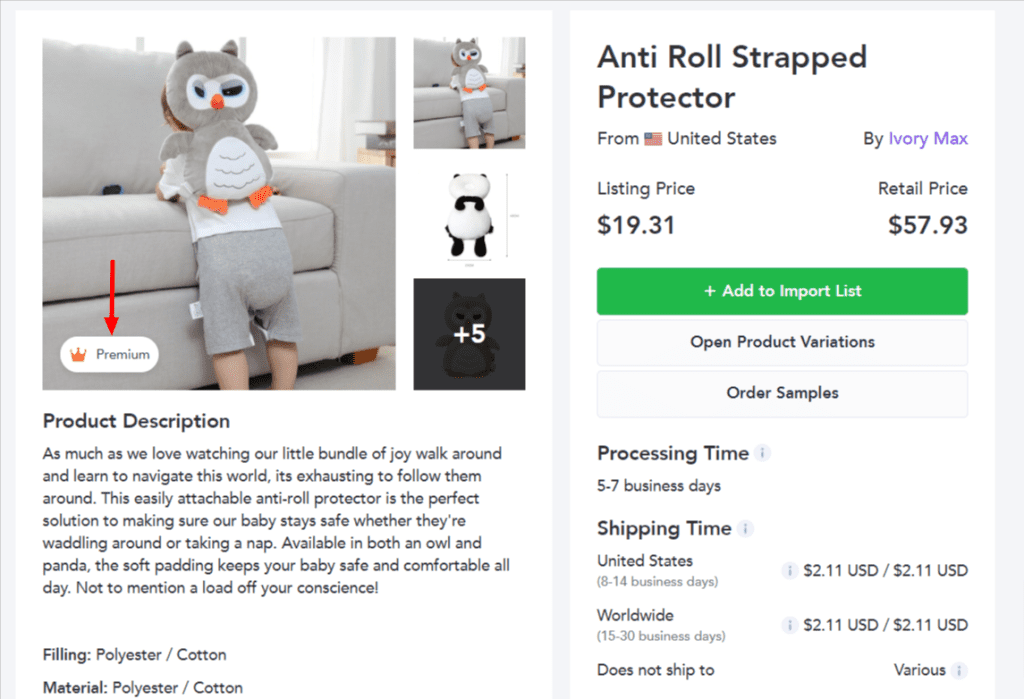
What's more, you can sell up to 25 premium products.
Premium products are a selection of high-quality products in Spocket's catalog sourced from the best suppliers on the platform.
Spocket's premium products are selected based on being one of the best-selling products in the catalog and being highly discounted.
Spocket's products are always discounted by 30-60%, and premium products are always at the high end of this range (source).
The Pro Plan also gives access to branded invoicing, an excellent feature that gives your store a branded feel.
Each package will include an invoice with your contact email, phone number, logo, and a personalized note, branded with your invoicing.

According to Spocket, the Pro Plan is the most popular monthly pricing plan. And in our opinion, this could definitely be true.
This Spocket pricing plan provides a nice balance between cost and features, as it offers features like selling premium products and branded invoicing.
The Empire Plan

Let's continue with the Empire Plan.
It costs $99.99 per month or $57 per month when billed annually ($684 per year).
Compared to the Pro Plan, the Empire Plan increases the limit of unique products from 250 to 10,000. It also increases the limit of premium products from 25 to 10,000.
The rest of the features are the same as the Pro Plan, which offers branded invoicing, 24/7 chat support, and AliExpress dropshipping.
To conclude, the only reason you should opt for the Empire Plan is when you've scaled your product catalog and need more than 250 unique or 25 premium products.
The Unicorn Plan

Lastly, we have Spocket's most expensive pricing plan, the Unicorn Plan.
This plan costs $299 per month.
Like the Empire Plan, it enables you to sell up to 10,000 unique and 10,000 premium products. It also offers 24/7 chat support and the AliExpress dropshipping feature.
New features that aren't available on any other plan include supplier sourcing, product requests (which allow you to request products that aren't already on Spocket), and bulk checkout (which enables you to check out multiple orders at once with one click).

Even though the Unicorn Plan is Spocket's most expensive plan, it could be worth it if you manage a store that consistently receives orders.
The best features of this plan are the high limit of premium products, the product request feature, and the bulk checkout feature.
With the product request feature, you can add sourcing requests for new products in your niche and keep innovating your store. Besides, the bulk checkout feature will help you save a lot of time on order processing!
Spocket free trial: An overview of all possibilities
If you are dropshipping on a low budget, you might be wondering if you can use Spocket for free.
You can use Spocket for free if you use Spocket's 7-day free trial, or even 30 days for free using our special offer:
Exclusive Spocket offer: Enter the coupon code: SpocketTrial during checkout, and you'll instantly unlock a FREE 30-day trial. Click here to redeem your free trial now!
Spocket offers its 7-day free trial for all plans, which is great if you want to quickly test a product or the platform itself:
| Spocket Pricing Plan | Starter Plan | Pro Plan | Empire Plan | Unicorn Plan |
| Free Trial Available? | Yes | Yes | Yes | Yes |
| Free Trial Duration | 7 days | 7 days | 7 days | 7 days |
The free trial can be activated without a credit card and can be canceled at any time. Just remember that you will have to pay the regular monthly or annual fee to keep the selected plan's features!
Why should you use Spocket?
You now know a bit more about Spocket's pricing plans, but what are some reasons why you might need Spocket for your dropshipping store?
Well, as a dropshipper, you sell products that you don't have in stock. Once a customer places an order, you forward it to your dropshipping supplier, who then ships the product(s) directly to your customer.

Some of the tasks that you will come across when dropshipping include:
- Finding products to sell from dropshipping suppliers.
- Uploading these products to your online store.
- Buying products from your supplier to fulfill your customer's order (order fulfillment).
- Managing your product's stock levels to avoid selling out of products.
- Updating the tracking numbers and order statuses for your orders.
And guess what?
These are all things that a dropshipping app like Spocket can either automate or make a whole lot easier!
To conclude, you will need to use a dropshipping app like Spocket to connect your online store to a supplier, making it easier to fulfill your orders.
There are a few dropshipping apps out there, but Spocket is an excellent choice if:
- You want a dropshipping app that lets you dropship with US or EU suppliers and significantly reduce your shipping times, and you don't mind paying a bit extra.
- You run a dropshipping store on Shopify or any other popular ecommerce platform.
- You want to give your store a bit more of a 'branded' feel by using Spocket's branded invoicing feature.
Another popular dropshipping app is called DSers. You can learn more about how the two compare in this article or using the following infographic:

FAQs about Spocket pricing plans
If you aren't sure which pricing plan from Spocket is right for you, you might have some questions we haven't answered yet.
To answer those questions, we have created this FAQs section about Spocket pricing plans:
How do I update my payment details on Spocket?
To pay for Spocket's paid pricing plans, you will need a valid credit card entered in your payment details on Spocket. If you wish to update your credit card details in your Spocket account, you can do that through your Spocket account settings here.
How do I change my currency on Spocket?
When browsing Spocket's product catalog, all prices will be displayed in USD. Once you add products to your import list, Spocket will convert the USD price to the currency of your online store.
Therefore, if you want to change the converted currency, you will have to change your store's currency through your ecommerce platform. You can find more information about this here.
How do I cancel my Spocket subscription?
You can easily cancel or pause your Spocket subscription through the Membership settings in the Spocket app. There, you can click the 'Cancel Membership' button to cancel your Spocket subscription.
How do I find the invoices for my Spocket orders?
You can find your invoices in the 'My Orders' section of the Spocket app. You will find two types of invoices there: branded invoices (sent to your customer) and payment receipts (invoices for the orders you have paid for).
Can I transfer my paid Spocket subscription to another dropshipping store?
Yes, you can transfer your paid Spocket subscription to another dropshipping store. First, cancel your existing plan. Then, you can submit a request to Spocket to transfer your credit to a new store by emailing support@spocket.co.
Can I get a refund on Spocket pricing plans?
You can cancel your Spocket plan at any time, but Spocket does not offer refunds for paid pricing plans. So, if you cancel your subscription, it will no longer auto-renew, but you will have access until the end of your subscription period and won't get a refund.
Can I get a discount on Spocket pricing plans?
Yes, you can get a discount on Spocket pricing plans by paying yearly instead of monthly. This can result in up to eight months off compared to paying monthly.
Alternatively, you can also get a 7-day free trial through this link!
Related pricing plan guides
Not sure yet about using Spocket? Or are you curious about what other companies are out there for your online business?
We've got you covered! Check out the lists below to find more great companies:
- BigBuy Pricing Plans Guide
- Printful Pricing Plans Guide
- Printify Pricing Plans Guide
- Sellvia Pricing Plans Guide
- Sell The Trend Pricing Plans Guide
- Shopify Pricing Plans Guide
- Syncee Pricing Plans Guide
Conclusion
Congratulations, you are now an expert on Spocket pricing plans!
This article should provide all the information you need to choose the pricing plan that best fits you.
If you have any further questions for us, don't hesitate to ask them in the comment section below!
Lastly, if you have decided that Spocket is not for you, here are some awesome Spocket alternatives!
Want to learn more about dropshipping?
A few we'd point you to:
- Can You Do Dropshipping With USA-Made Products?
- How Do You Pay a Dropshipping Supplier for Their Products?
- Product Samples for Dropshipping: The Complete Guide (2026)
New to dropshipping? We cover what it actually takes in our guide on how to start dropshipping here.