Ensuring all customers of your Shopify store are satisfied can be more challenging than it sounds.
If you're not careful, it can quickly become a frustrating experience, especially for beginners.
Luckily, there are Shopify apps that can help you build a more cohesive relationship with your customers.
Best Shopify Apps for Customer Service Shortlist
Here's our shortlist of the top Shopify customer service apps in 2026:
- Best for Unified Support Inbox: Tidio - Live Chat & Chatbots - One dashboard for live chat, instant messages, and email plus chatbot and Messenger integrations helps stores respond faster.
- Best for AI Product Recommendations: Commerce AI - Store-trained AI product recommendations, analytics, and multilingual support help merchants deliver more personalized shopping conversations.
- Best for Social Messaging Support: PingMe Facebook Messenger Chat - Facebook, Messenger, Instagram, and WhatsApp chat support helps stores stay reachable across the channels customers already use.
- Best for WhatsApp Cart Recovery: WhatsApp Abandoned Cart & Chat - WhatsApp live chat, cart recovery templates, and automated order updates help stores support customers on a familiar messaging channel.
- Best for Searchable Help Center: HelpCenter | FAQ Chat Helpdesk - Searchable FAQs, customizable product tabs, and chatbot workflows help stores organize common questions in a clear help center.
- Best for SEO-Friendly FAQ Pages: Easy FAQ Page, Customer FAQs - Custom themes, FAQ search, translations, and Google FAQ schema help stores build polished FAQ pages that are easier to navigate.
- Best for Accordion Product Tabs: EasySlide Accordion tabs & FAQ - Accordion tabs organize long descriptions and FAQ content across products, collections, and store pages for a cleaner buying experience.
- Best for Branded Order Tracking: AfterShip - Branded tracking pages, shipment notifications, and resolution visibility help stores deliver a stronger post-purchase experience.
- Best for WISMO Reduction: Parcel Panel Order Tracking - Automatic courier matching, branded tracking, and smart dashboards help reduce routine "Where is my order?" support requests.
- Best for PayPal Tracking Sync: Proveway - Automatic PayPal and Stripe tracking sync plus one-click past order processing help reduce holds and speed up fund access.
This article will discuss the ten best Shopify apps for customer service and tell you all about their features, pricing, and overall rating.
How do you decide which customer service apps are a worthwhile investment of your time? We're here to help.
Let's get started!

Start your store on Shopify
Free 3-day trial + $1/month for 3 months
- Grows with you from first test product to full brand
- Thousands of apps and hundreds of themes to customize your store
- Beginner-friendly editor with pro features when you're ready
No card to start. Cancel anytime.

The 10 best customer service apps on Shopify: An Overview
If you want to get the most out of this article quickly, check out our overview table below:
| Shopify App | Category | Pricing | Read Review |
| Tidio | Live Chat | Free / $19 / $39 per month | Tidio Review |
| Commerce AI | Live Chat | $0 / $29 / $99 per month | Commerce AI Review |
| PingMe | Live Chat | Free / $4.99 per month | PingMe Review |
| Live Chat | Free / $9.99 / $29 per month | WhatsApp Review | |
| HelpCenter | FAQ Page | $3.99 / $10.99 / $15.99 per month | HelpCenter Review |
| Easy FAQ Page | FAQ Page | Free / $3.99 / $7.99 per month | Easy FAQ Review |
| EasySlide | FAQ Page | $5 per month | EasySlide Review |
| AfterShip | Package Tracking | Free / $11 / $70 / $239 per month | AfterShip Review |
| Parcel Panel | Package Tracking | Free / $9 / $49 / $399 per month | Tracktor Review |
| Proveway | PayPal tracking number sync | Free / $10 / $20 per month | Proveway Review |
The 4 best Shopify apps for live chat and customer contact
Live chat apps are essential for your store because they give your customers a way to contact you whenever they have questions or problems they can't solve, which is much more satisfying than sending an email to a support team.
Since these live chat apps are part of a help desk package, they enable fast customer service on your website.
1. Tidio - Live Chat & Chatbots Review

Tidio is a live chat app on Shopify that makes communicating with your customers effortless.
It's a live chat app with advanced features, including integration with chatbots, Instagram, and Facebook Messenger.
It's all you need to easily engage with your visitors!
Key features
- Tidio lets you view all your live chat, instant message, and email conversations in one dashboard, saving you time.
- Installation and setup in less than 30 seconds.
- Responds to your customer's questions automatically!
- Browse your product directory and recommend products directly in the chat.
Rating
The Tidio app has a score of 4.8 out of 5.

Pricing
The free plan offers a maximum of three chat operators, and chatbot conversations with up to 100 visitors per month are permitted.
Included are unlimited live chats and multilingual widgets.
For the Communicator plan, you can add up to 40 agents; all of the free features are included, as well as live typing, viewed page, live visitors list, and the ability to set permissions.

2. Commerce AI Review

Tidio's AI chatbot is great, but what if there were an AI chatbot that's specifically trained to suggest the perfect products to your customers?
That's Commerce AI for you!
It delivers a personalized shopping experience that feels like a one-on-one conversation with a member of your sales team.

Furthermore, it trains itself on your store's website content, so it can answer a wide range of questions, from simple to more complex ones.
Key features
- Personalization. You can customize the chatbot's appearance and voice to align with your brand. This makes the customer interaction feel unique and personal, unlike other AI chatbots.
- Advanced analytics. Get valuable insights into customer behavior through Commerce AI's detailed analytics.
- Multi-language support. Commerce AI can communicate with your customers in their preferred language, increasing engagement.
Rating
So far, Commerce AI has received a perfect 5.0 out of 5.0 rating on the Shopify App Store:

Pricing
Commerce AI charges between $0 and $99 per month, depending on your store's monthly pageviews.

This is great because if you're just starting out with your store, you can use this AI tool for free!
3. PingMe Facebook Messenger Chat Review

Live chat with shoppers on Facebook, Messenger, and Instagram with PingMe Facebook Messenger Chat on Shopify.
Like Reamaze, it actively offers customer care across many channels, including Facebook, Messenger, Instagram, and WhatsApp.
Key features
- Quick and simple setup. In 30 seconds, you can set up a Messenger live chat on your website.
- Keep conversions consistent across all shopping channels, including Facebook, Instagram, and your Shopify store.
- 24/7 live support chat.
Rating
It has a 4.9 overall rating on Shopify.

Pricing
PingMe is a freemium app.
With the offered premium plan for $4.99 per month, you can also send emails and direct messages from Instagram.

4. WhatsApp Abandoned Cart & Chat Review

WhatsApp's Abandoned Cart and Chat allows Shopify store owners to display WhatsApp live chat and share buttons on their site.
Customers and store owners benefit from quick and convenient customer support via WhatsApp live chat.
Because it has pre-made templates for order updates, tracking, and confirmation, the app can send automated messages on WhatsApp.
It also includes templates for cart recovery and discounts. All of these are available in 11 languages and have been pre-approved by WhatsApp.
WhatsApp is one of the most commonly used apps. Almost all customers have it downloaded to their smartphones, and Shopify store owners can use this channel to stay in touch with their customers.
In a nutshell, it could be an efficient CRM that keeps all customers happy.
Let's take a look at its features!
Key features
- Customers who contact you after hours will receive a personalized message.
- You can easily add a share button to your website so that your customers can easily share it with their WhatsApp friends.
- Email alerts for each abandoned cart.
- Smart SMS Fall Back.
- Automated Order Confirmation messages.
Rating
The total rating for this app is 4.9/5

Pricing
WhatsApp Abandoned Cart and Chat is free to use for up to 100 Manual cart abandonment recovery messages.
However, it also has a monthly plan for $9.99 and a $29 plan.

The 3 best Shopify apps for FAQ pages
The FAQs (frequently asked questions) page apps use a question-and-answer format to help your customers quickly.
They offer several style options to blend perfectly with your website.
Let's move on to the top three FAQ apps!
1. HelpCenter | FAQ Chat Helpdesk Review

Want to create your customized FAQ page on Shopify? Don't worry; this app is what you need!
HelpCenter is one of the best Shopify apps for creating your FAQ page and displaying all common customer questions in a clear overview.
Key features
- Create your own customized and attractive FAQs from scratch.
- You can create world-class, fully customizable tabs for your product pages.
- Enable chatbot workflow builder.
- Publish searchable questions and answers organized into sections and categories.
Rating
The overall rating of the FAQ HelpCenter is 4.7.

Pricing
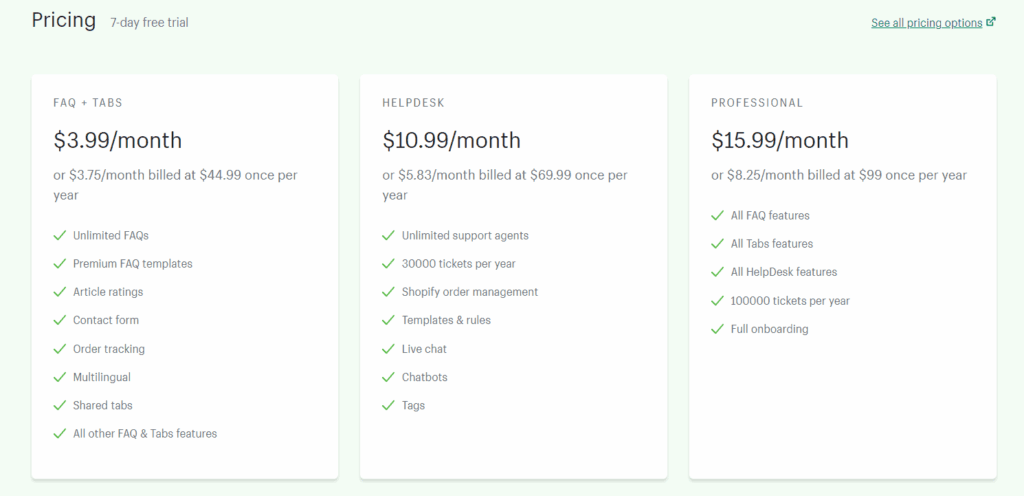
This app offers a 7-day free trial to let you explore its features before deciding on a monthly plan.
The premium plans will enable you to complete FAQs, track orders, and access premium FAQ templates, among other things.
2. Easy FAQ Page, Customer FAQs Review

If you're looking for a tool to build the perfect FAQ page or product FAQ, you should consider Easy FAQ Page, Customer FAQs.
The Easy FAQ Page app makes it simple to design modern FAQ pages for your store, and it's carefully designed with all end users in mind, making your life easier.
Remember, your FAQ page should deal with customers' most general questions about your product or services.
Key features
- Four fully customizable themes.
- Google FAQ schema support to boost store SEO.
- Allow customers to search for FAQs through the search bar on the checkout success page.
- Template live preview.
- Native store language translations.
Rating
The overall rating for this app is 5.0!

Pricing
The accessible FAQ page is a free app to use, where you can get unlimited customizations, unlimited categories, and ten FAQ pages.
Isn't that amazing?
The app also offers paid plans with even more features.

3. EasySlide Accordion tabs & FAQ Review

EasySlide Accordion tabs and FAQ is an app that helps you optimize your store's UI/UX and sales by organizing product descriptions into an accordion tabs widget with multiple sliding tabs.
This app helps improve your store and boost your sales by letting you quickly add an FAQ page to your store, add questions and answers directly to your Page content, and automatically convert the page to Accordion tabs.
Key features
- With accordion tabs, you can quickly organize a lengthy descriptive text.
- This program has multi-purpose tabs, so you may use them to make elaborate FAQ pages or add accordion tabs to your product descriptions.
- Add accordion tabs to individual goods, collections, or all of your products at once.
- Assign tabs to all products.
Rating
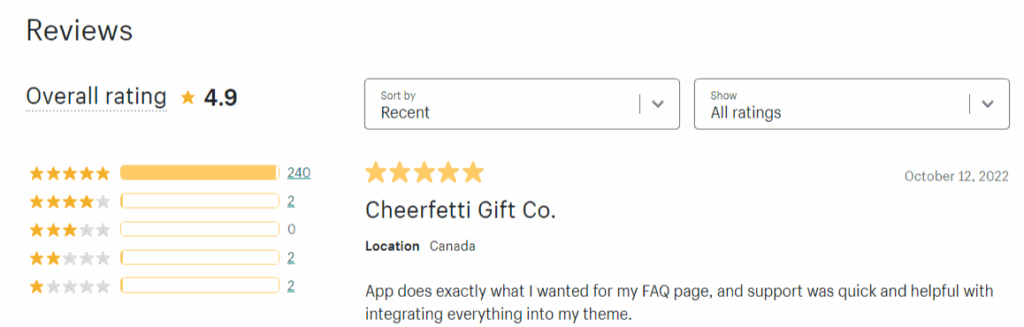
The overall rating for this app is 4.9.
Pricing
EasySlide Accordion tabs & FAQ app offer a 7-day free trial.

The 3 best Shopify apps for order tracking
The order tracking page is a crucial tool for any ecommerce store, as it allows customers to track the status of their order from the moment it's placed to when it reaches their door.
This section will discuss some of the most popular order-tracking apps.
Are you ready? Let's get started!
1. AfterShip Review
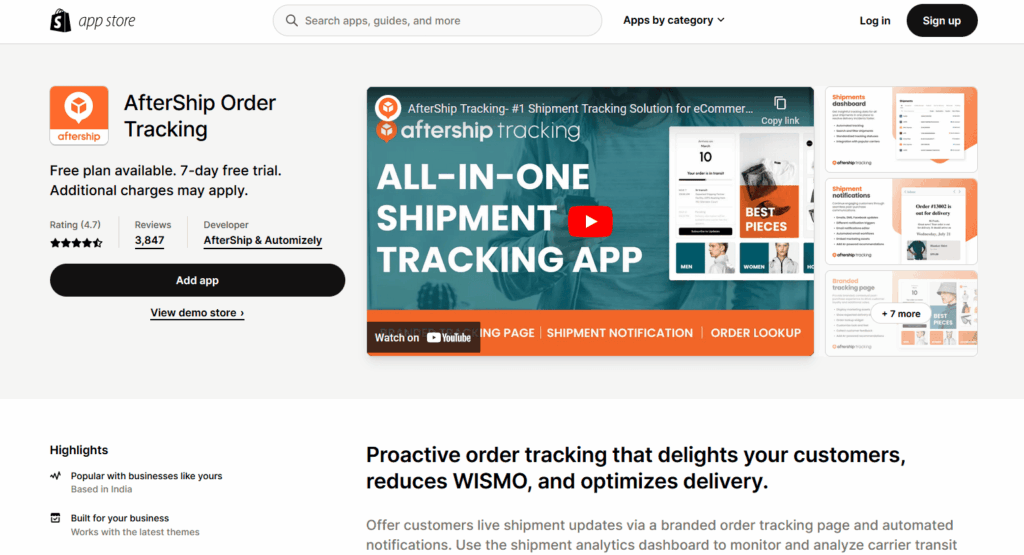
AfterShip is the top order tracking app that provides insightful tracking data in one overview for you and your customers.
Key features
- AfterShip has its own branded tracking page that provides the best post-purchase experience to drive customer loyalty and additional sales.
- This app also alarms you for shipment notifications. They do their best to engage with your customers and keep them up to date on their order tracking.
- Send shipping notifications from your email address.
- 24/7 resolution status visibility.
Rating
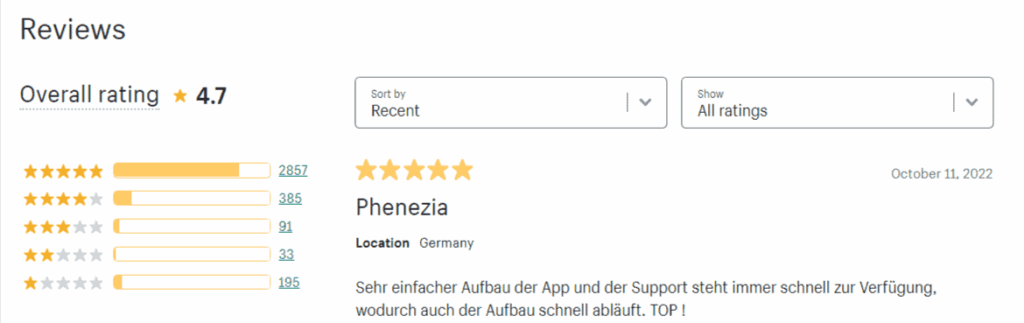
According to Shopify, this app has an overall rating of 4.7.
Pricing
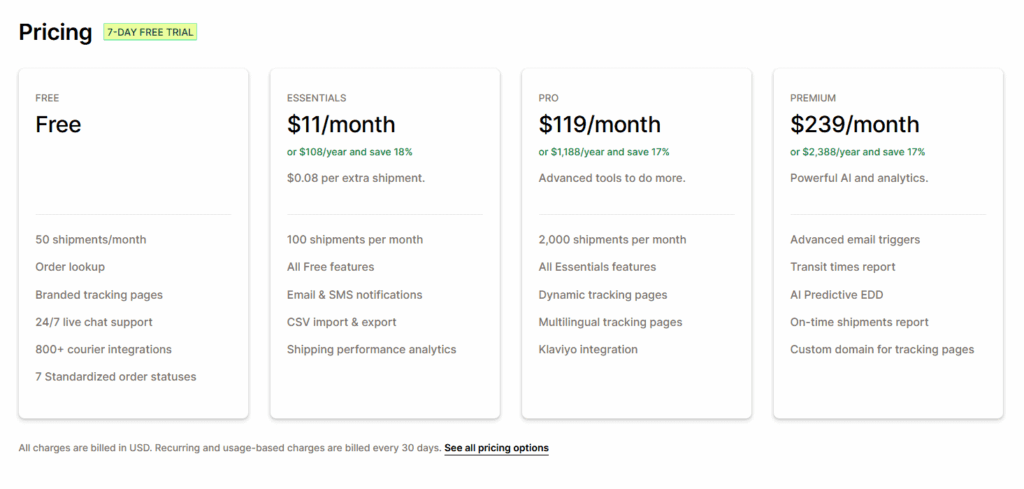
AfterShip offers a free plan with limited parcel shipments, 24/7 live chat support, order lookup, and 800+ courier integrations.
It also offers paid plans with more features:
2. Parcel Panel Order Tracking Review

Parcel Panel Order Tracking app uses intelligent bots to track your orders and inform you about the parcel.
If you check out the premium plan this app offers, you'll be amazed by the variety of amusing features it offers.
Key features
- Easily track all of your orders at once.
- Eliminates the need to respond to "Where is my order?"
- YunExpress's last-mile tracking solution.
- Automatic and accurate courier matching.
Rating
According to Shopify, this app has an overall rating of 4.9.

Pricing
Parcel Panel Order Tracking offers a free plan where you can place 20 orders per month, access to 1000+couriers, use a branded tracking page, a smart dashboard, order status page tracking, and Shopify native notifications.
The app also offers paid plans with more features.

3. Proveway Review

Before we proceed to the end of the article, there's one more party that would like to know your tracking number.
It's PayPal!
PayPal is known to be strict with dropshippers, but uploading your tracking numbers on their platform can greatly reduce your risks.
And why would you do it manually if there's an app that can automate it?
Proveway automatically syncs tracking numbers to PayPal, helping build trust, reduce funds on hold, and get funds faster.

With this app, you can keep your business transparent to PayPal and avoid unwanted disputes, money on hold, and reserves.
Key features
- Automatically sync your tracking numbers to PayPal and Stripe.
- Process orders from the past 3 months in one click!
- Advanced PayPal courier matching.
Rating
According to Shopify, this app's overall rating is 4.9:

Pricing
Pricing for Proveway ranges from $0 to $19.99 per month, depending on how many shipments you have each month:

Now that you've read about all these fantastic apps, let's discuss why customer service matters for your store.
Why does customer service matter?
When speaking of why customer service matters, it's because it represents your brand. Customer service may make or break a business's ability to convert visitors into customers.
89% of customers say they are more inclined to make another purchase after receiving good customer service.
When you provide your customers with a delightful service, customers are more inclined to remain loyal to your business.
Taking action
If you want to act on this, here's where to start:
- We recommend installing a live chat, FAQs, and order tracking app on your Shopify store for the best customer experience.
- Check out each app's features and pricing on the list to see which is best for you, and don't forget to factor in your budget!
- For the live chat on your Shopify store, we recommend you install the Tidio app.
- For the FAQs, consider installing the HelpCenter app.
- And for order tracking, we recommend AfterShip.
The combination of these apps makes your customer support, without a doubt, more robust and your Shopify store more legit.
More amazing Shopify apps
If you found some interesting Shopify apps in this list and are looking for more, we've got you!
Just check out our other articles below:
- Most Popular Shopify Apps
- Best Shopify Security Apps
- Best Print on Demand Shopify Apps
- Best Shopify Apps for Dropshipping
- Best Shopify Inventory Management Apps
- Best Shopify Apps for Successful Dropshipping Stores
Conclusion
We've listed all the top customer service-oriented apps, their features, pricing, and overall ratings.
These apps will undoubtedly help your store, whether it's big or small.
We hope this article was helpful to you. If you have any questions, feel free to comment below!
Want to learn more about Shopify?
Here's what we'd look at next:
- 24 Most Common Shopify Store Mistakes to Avoid & Tips
- Shopify Free Trial in 2026: How It Works (Length & Limits)
- The 14 Best Free Shopify Apps to Install To Save Money in 2026
New to Shopify? We cover what it actually takes in our how to start a Shopify store guide here.