

Have you ever wondered how to get more product research data from AliExpress?
You're not alone!
AliExpress offers a free tool called the Dropshipping Center that can help you find products, check demand, and negotiate better prices with suppliers.
The problem?
Most dropshippers only use the basic product search and never look deeper.
In this guide, we'll show you how to activate the AliExpress Dropshipping Center, what each tool does, and how to use the data without treating it like a guaranteed winning-product finder.
Quick Answer: How to access the AliExpress dropshipping centerThe fastest way in 2026 is to visit https://ds.aliexpress.com/, log in with your AliExpress account, and accept the terms.In our latest test, this worked on a brand-new AliExpress account with no prior orders.
We've tested the tools inside the Dropshipping Center, including the RFQ system and the current access routes.
Let's go more in-depth now!

Start your store on Shopify
Free 3-day trial + $1/month for 3 months
- Grows with you from first test product to full brand
- Thousands of apps and hundreds of themes to customize your store
- Beginner-friendly editor with pro features when you're ready
No card to start. Cancel anytime.
What is the AliExpress Dropshipping Center?
So, what exactly is the AliExpress Dropshipping Center?
Basically, it's a free AliExpress product research and supplier sourcing platform built into AliExpress.
It sits on top of AliExpress's huge product catalog and helps you find products on AliExpress, analyze demand, and ask suppliers for lower prices.
And the best part?
It's free!
You can use it even if you're not dropshipping with AliExpress.
For example, even if you're dropshipping without AliExpress, you can still use the Dropshipping Center to spot product ideas, compare suppliers, and understand what is selling on the platform.
That matters because AliExpress is still a big part of Alibaba's international ecommerce business.
In FY2025, Alibaba's international commerce retail business generated RMB 108.5 billion (US$14.9B), up 33% year over year, primarily driven by AliExpress and Trendyol.
In short: AliExpress is still one of Alibaba's key international ecommerce platforms, and the Dropshipping Center is one of the free research tools it gives sellers and dropshippers access to.
Keep in mind: the Dropshipping Center is a research tool, not a product picker that guarantees winners. It can show you what is getting attention on AliExpress, but you still need to check demand, suppliers, shipping, and your own store data.
The 3 tools inside the AliExpress Dropshipping Center
Now that you know what the Dropshipping Center is, let's look at what's inside.
There are three main tools:
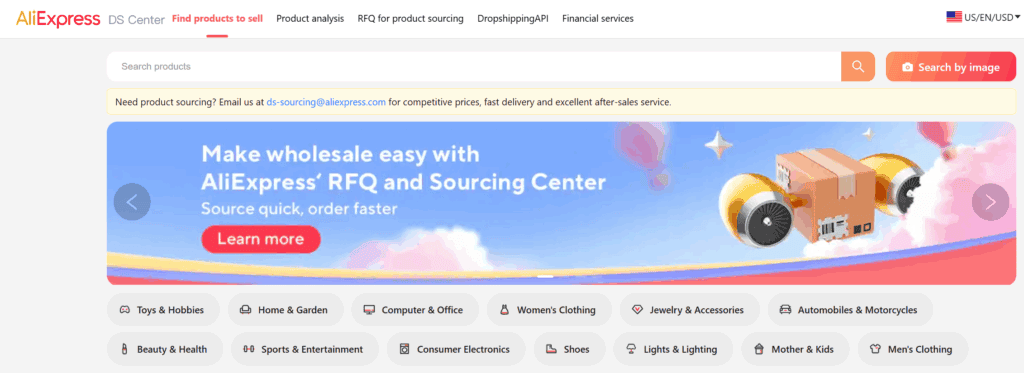
- Find AliExpress products to sell. This is the main product discovery tool. You can browse categories, use winning-product filters, search by image, and look at growth-rate signals.
- AliExpress product analysis. Paste any AliExpress product URL to see a sales-volume index, a price history chart, and a logistics reliability score.
- RFQ for product sourcing. Request a quotation from suppliers for lower prices, custom branding, or volume discounts.
Let's begin with the tool that helps you find products to sell:
Tool 1: Find AliExpress products to sell
This is the main product research tool inside the Dropshipping Center.
It shows you what's selling on AliExpress in different categories, with sales counts, shipping filters, and growth signals.
If you don't pick a category, you can browse by filters like 'Winning products' or 'Recommended for you'.
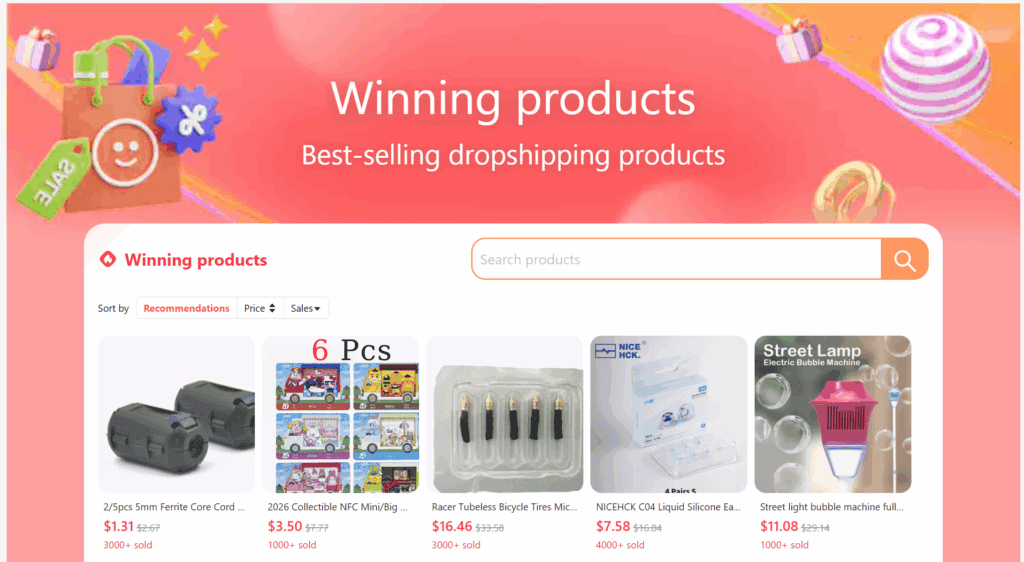
You can also sort by ship-from location, price range, and sales volume:
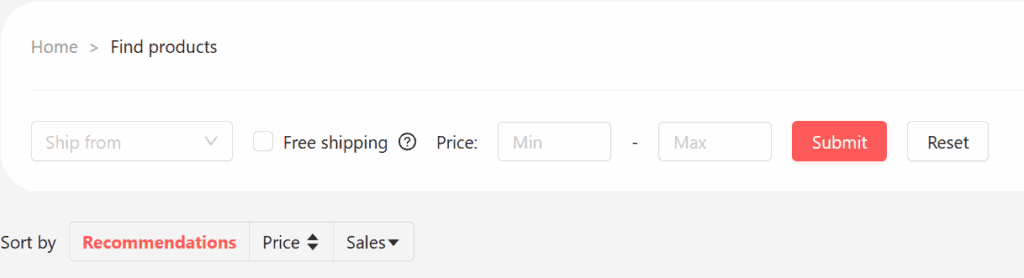
That is useful if you want to look for products that ship from the US or the EU rather than from China.
For US-focused stores, we also have a separate guide on finding US dropshipping suppliers on AliExpress.
Each result shows the number of units sold and, for some products, a 7-day growth rate.

Two things are worth paying attention to here:
- Amount of products sold. This gives you a quick idea of how popular the product is on AliExpress.
- Growth rate. This shows whether a product is picking up recently, which can help you find products before they become too crowded.
And that's not all!
There is also an image search mode. Upload a product photo, and AliExpress will look for visually similar listings across the catalog.
This can help when you already have a product idea and want to compare suppliers before importing it to your store:

For example, we tested this with a popular showerhead listing, and AliExpress returned the exact product plus several lookalike suppliers:

Hot signal vs. Growth signal
One thing that can confuse beginners is the difference between a Hot product and a Growth product.
They sound similar, but they are not the same:
- Hot products. These are products with high, stable order volume. That means demand is already proven, but competition is usually higher too.
- Growth products. These are products where order volume has been climbing recently. They may be earlier in the trend, but they are also less proven.
So, which one should you choose?
If you're new and want lower risk, start with Hot products and focus on finding a better marketing angle.
If you can test quickly, Growth products can be interesting because fewer stores may have found them yet.
Just don't treat either label as a guarantee. You still need to check the supplier, shipping time, price history, and whether the product fits your audience.
Filter by US or EU warehouse for faster delivery
This filter can make a big difference.
AliExpress Standard Shipping from China typically takes 10 to 45 days, depending on the destination, supplier, shipping method, and customs clearance.
Listings tagged 'Ships from US' or 'Ships from EU' can be much faster, sometimes around 2 to 7 business days.
This matters because 63% of US consumers now expect two-day delivery, and slow delivery is one of the top drivers of cart abandonment.
So, if you sell to Western markets, it's worth checking the US or EU warehouse options first. For more options, read our guide on how to get faster shipping on AliExpress.
The product cost is usually higher, but faster delivery can be worth testing if your margin still works.
Note: AliExpress shipments to the US may now incur higher landed costs than before.
Executive Order 14256 ended duty-free de minimis treatment for covered low-value goods from China and Hong Kong starting May 2, 2025.
A later order suspended duty-free de minimis treatment globally for goods entered on or after August 29, 2025, and Executive Order 14388 continued that suspension in 2026.
Read the full tariff guide here.
Tool 2: AliExpress product analysis

Update May 2026: It doesn't seem this tool is fully active at the moment. It currently only shows 'Similar products' when pasting in an AliExpress URL.
This one is useful!
With the product analysis tool, you can paste any AliExpress product URL and click 'Search'.
Then, you will see three useful things: a sales volume chart, a price history chart, and a logistics reliability score.
Let's look at how to read them:
What 'Sale Volume' really means
This is one of the easiest parts to misunderstand.
The 'Sale Volume' chart looks like real sales data, but it is better to read it as a popularity score.
Important: the 'Sale Volume' number is a relative popularity index from 0 to 100, similar to how Google Trends works.
A score of 80 does not mean the supplier sold 80 units that day. It means the product shows stronger relative activity in the Dropshipping Center than lower-scoring products.
Use it to compare products, not to estimate exact revenue.
Once you know that, the chart becomes much more useful.
You can use it to see whether a product looks stable, growing, or falling compared with other AliExpress products.

How to read the price history chart
The price history chart helps you spot suppliers whose prices change too much.
Here are three patterns to look for:
- Flat or gradually declining. This is usually the cleanest pattern. Your margin is easier to predict.
- Erratic spikes up and down. Be careful. The supplier may be changing prices often, running out of stock, or testing different price points.
- Falling prices and falling sales. This can mean the product is losing demand. A lower price does not help much if fewer people want the product.
In simple terms: if the price chart looks messy, don't rush into scaling that supplier.
The 5 supplier checks we use before scaling
The Dropshipping Center also gives you logistics information, but you should still check the supplier manually.
These are the numbers we like to check before scaling a product:
Supplier checks before scaling
• Positive Feedback Rate: ≥ 95%
• Item as Described rating: ≥ 4.8
• Communication rating: ≥ 4.7
• Logistics / Shipping Score: ≥ 4.0
• Store age: ≥ 12 months
If a supplier misses two or more, we keep looking. A good product is not worth much if the supplier causes refund problems.
Here are a few red flags to watch for:
- Very low review count on a high-volume listing. The product may be new, or the reviews may not yet tell the full story.
- Store age under 12 months. Newer stores can still be fine, but there is less history to judge them by.
- No reply within 24 hours to a pre-order question. If communication is slow before you order, it probably will not improve when there is a problem.
- Logistics score below 4.0. This can lead to slow shipping, lost packages, and refund disputes.
You can only research one product at a time in this tool.
Also, the data is tied to the supplier URL you pasted. Another supplier selling the same product may show different numbers.
That's actually useful, because it lets you compare two suppliers for the same item.
If you want a deeper checklist, read our guide on how to find AliExpress dropshipping suppliers.
Tool 3: RFQ for product sourcing
RFQ stands for Request for Quotation.
Or, more simply said, it lets you ask suppliers for a better offer.
You can use it to ask for lower prices, custom packaging on AliExpress, or volume discounts, rather than accepting the listed retail price.
Simply fill in the form and then press the 'Submit' button:
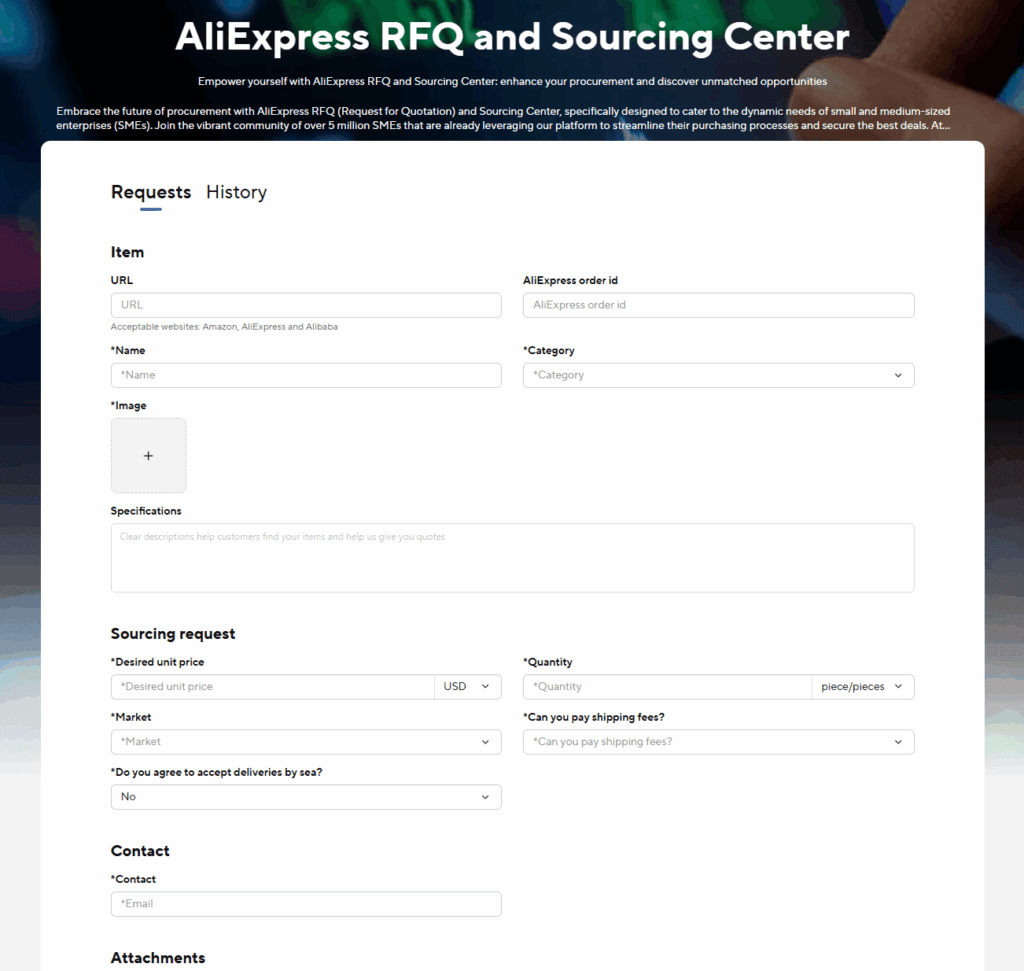
In many cases, replies can come in within 24 to 72 hours.
Cool, right?
When should you use RFQ?
We would not use the RFQ tool on day one.
It becomes more useful after you have found a product that is getting sales or at least strong testing data.
At that point, here are a few realistic things you can ask for:
- 10-30% off the listed price when you commit to 50+ units per month. Lead with volume, not desperation.
- Custom packaging or labels. Some suppliers can add your logo or a thank-you card for a small per-unit fee.
- Faster fulfillment. Some suppliers may prioritize your orders if you can show consistent monthly volume.
If a supplier will not move on any of these, send the same request to another supplier selling the same product.
That's one of the nice things about RFQ: you can compare replies instead of guessing.
How to use all 3 tools together
Now, let's turn the three tools into a simple workflow.
The goal is not to find one product and immediately build a store around it.
The goal is to build a shortlist, check the data, compare suppliers, and then order samples before scaling.
Step 1. Set your filters in Tool 1
Start by picking a category that matches your niche.
Then apply filters that actually affect your store:
- Price range, such as $5-$20 for impulse buys or $20-$80 for more considered products.
- Ship from the US or EU if you sell to Western markets.
- Free shipping if your margins are tight.
Then sort by 'Sales' to start with products that are already moving.
Step 2. Look at Hot and Growth products
First, scan the Growth products.
These can help you find products that are starting to pick up before every store is selling them.
Save 3 to 5 ideas to a research list.
Then look at Hot products and save 2 to 3 safer backup ideas with proven demand.
Tip: cross-check your ideas with Google Trends.
If both Google interest and Dropshipping Center activity are rising, that is a stronger signal.
If interest in Google Trends is falling but AliExpress activity is rising, investigate more before committing. It might be a short spike, or it might be specific to AliExpress.
Academic research from Rice Business shows Google search trends can help forecast retail sales, so this is not just a random guess.
Step 3. Run each product through Tool 2
Now paste each product URL into the product analysis tool.
Check three things:
- Sale Volume direction. Is the 0-100 score flat, rising, or falling?
- Price history. Is the price stable, or does it jump around?
- Logistics score. Is it 4.0 or higher?
If the sales line is falling, the price chart is messy, or the logistics score is weak, we would move on.
Step 4. Vet the supplier
Next, open the supplier's store page and check the supplier numbers.
As a reminder, we like to see Positive Feedback ≥ 95%, Item as Described ≥ 4.8, Communication ≥ 4.7, Logistics ≥ 4.0, and store age ≥ 12 months.
Then send the supplier one simple pre-purchase question through AliExpress messages.
A reply within 24 hours is a good sign. Silence is not.
Step 5. Submit an RFQ and order samples
Once a product passes the first checks, use Tool 3.
Submit an RFQ to two or three suppliers selling the same product.
You can ask for a 10-20% price reduction at 50 units per month, which can help protect your dropshipping profit margins.
While you wait for quotes, place 2 to 3 sample orders at the listed price to your own address.
This is the only way to check what customers will actually experience: shipping time, packaging quality, and whether the product matches the photos.
Skipping samples is one of the fastest ways to learn about supplier problems from refund emails rather than through your own testing.
5 common mistakes when using the AliExpress Dropshipping Center
Before we move on, here are a few mistakes to avoid:
- Treating Hot products as guaranteed winners. Hot means there is demand, but it also means other sellers may already be competing hard.
- Ignoring the price history chart. A product can look cheap today and still have a messy pricing history. Check the chart before scaling.
- Choosing suppliers only by price. The cheapest supplier is not always the best one. Bad shipping and refunds can cost more than the small savings.
- Skipping sample orders. Product photos and delivery estimates do not tell you everything. Order samples before sending customers to a supplier.
- Using Sale Volume as an exact sales number. It is a 0-100 popularity score, not real unit sales. Use it for comparison, not revenue forecasting.
How to activate the AliExpress Dropshipping Center
The easiest way to activate the AliExpress Dropshipping Center is to go directly to the sign-up page:
Go to https://ds.aliexpress.com/, log in with your AliExpress account, and accept the terms.
That's it!
Once you finish the sign-up steps, the Dropshipping Center should open in your AliExpress account:
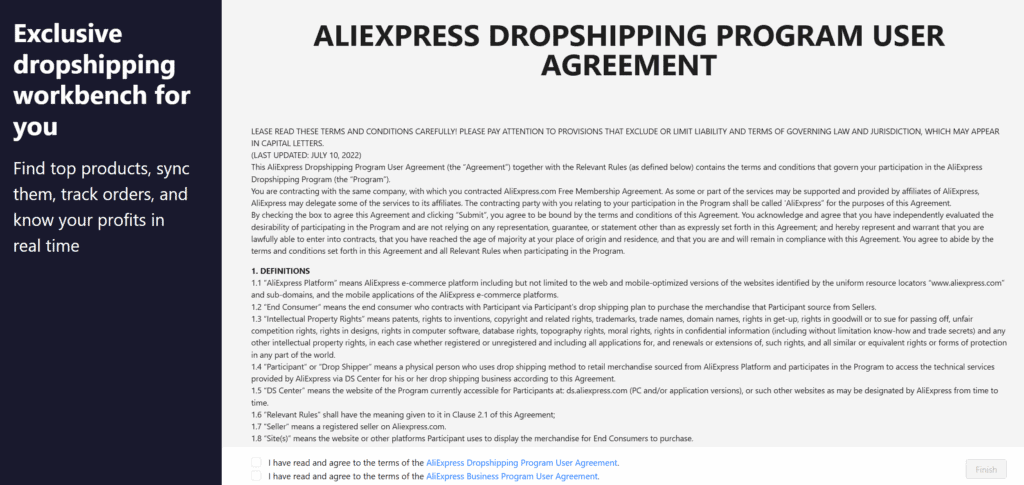
We tested this method on a brand-new AliExpress account in 2026, and the Dropshipping Center was activated within a minute!
How to access the Dropshipping Center once it's activated
Once the AliExpress Dropshipping Center is activated, you can find it in your AliExpress account menu:
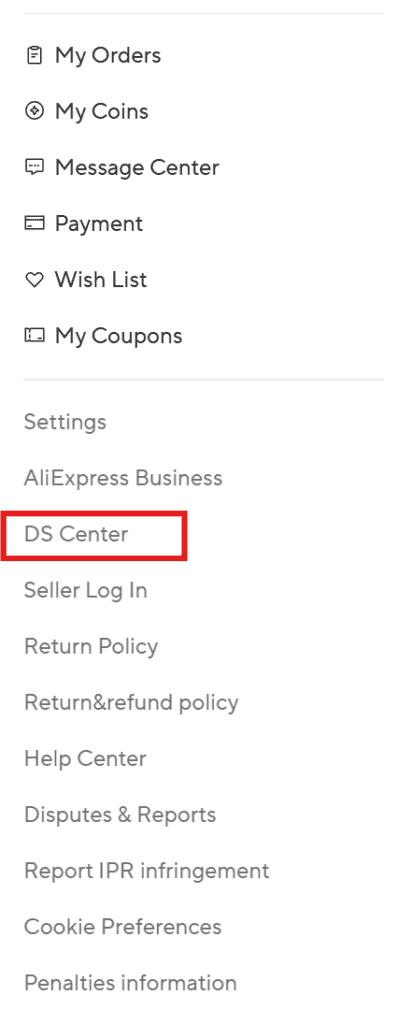
If you do not see it there, use the direct link while logged in: https://ds.aliexpress.com/.
AliExpress vs. Alibaba Dropshipping Center: Which one do you need?

Did you know there is an Alibaba Dropshipping Center too?
They share a name and a parent company, but they are not the same tool.
Here is the simple difference:
| Feature | AliExpress Dropshipping Center | Alibaba Dropshipping Center |
|---|---|---|
| Primary purpose | Product research and supplier sourcing | Connecting your store to Alibaba suppliers |
| Research tools included | Find Products, Product Analysis, RFQ | Limited, sourcing-focused |
| Supplier type | Retail sellers, low minimums | Wholesale and manufacturer-direct, B2B |
| Order minimums | 1 unit per order | Often 50+ units, negotiable |
| Best use case | Finding and testing winning products | Scaling a proven product with private label |
In short: use the AliExpress Dropshipping Center to find and test products.
Switch to Alibaba once a product is proven and you want lower per-unit costs at scale. If you are still comparing both platforms, read our full Alibaba vs. AliExpress breakdown.
If you want the full breakdown, read our guide here: Alibaba Dropshipping Center Guide 2026: How It Works.
FAQs about the AliExpress Dropshipping Center
Is the AliExpress Dropshipping Center free?
Yes. Every tool inside the Dropshipping Center, including Find Products, Product Analysis, and the RFQ system, is free to use with an AliExpress account.
Can you use it if you're not dropshipping with AliExpress?
Yes. As long as you have an AliExpress account and can access the Dropshipping Center, you can use it for product research even if you fulfill orders elsewhere or have not launched a store yet.
My AliExpress Dropshipping Center is not showing. What should I do?
First, clear your browser cache and reload AliExpress. If the button is still not visible, try the direct link at https://ds.aliexpress.com/ while logged in. If that fails, try another browser or a different AliExpress account.
Is the Dropshipping Center available in every country?
The Dropshipping Center is widely available on AliExpress, but access may vary by account, region, language, and interface version.
If you cannot see the button in your AliExpress header or footer, try the direct link at https://ds.aliexpress.com/ while logged in.
Summary
Before we go to the conclusion, here is a quick summary of this article so you can easily remember it:
- You can usually activate the AliExpress Dropshipping Center for free at https://ds.aliexpress.com/ in a few minutes. In our latest test, this worked with no prior orders.
- The Dropshipping Center has three tools: Find Products, Product Analysis, and RFQ for product sourcing.
- The 'Sale Volume' number is best used as a 0-100 popularity score, not as an exact sales count.
- Hot products have proven demand, but they can also be more competitive.
- Growth products can be interesting if you can test quickly, but they are not guaranteed winners.
- Before scaling, check supplier feedback, item rating, communication, logistics score, and store age.
- Use US or EU warehouse filters when selling to Western markets if the product, supplier, and margin still make sense.
- Always place 2 to 3 sample orders before sending customers to a supplier.
- Use the AliExpress Dropshipping Center for finding and testing products, and Alibaba when you want to scale a proven product with private label or larger order volume.
Tip: The Dropshipping Center is just one option. Compare it with the best product research tools and the best dropshipping product research tools to build your ideal research stack.
Conclusion
So, there you have it: the AliExpress Dropshipping Center!
We hope you now know how to access it, what each tool does, and how to use it for product research.
The biggest thing to remember is this: use the data as a guide, not as a guarantee.
The Dropshipping Center can provide product ideas, supplier leads, and useful demand signals.
But you still need to check shipping, order samples, review the supplier, and test the product in your own store.
Don't forget to treat your dropshipping store like a real business and not a way to get rich overnight. Good luck!
Want to learn more about AliExpress?
Here's what we'd pick up next:
- AliExpress Product Discovery: 6 Great Product Research Tools
- How to Find Dropshipping Products on AliExpress (9 Tips)
- 20 Best AliExpress Products for Dropshipping in 2026
- How to Find AliExpress Dropshipping Suppliers (+ Checker)
- How to Find US Dropshipping Suppliers on AliExpress in 2026
- How to Get Faster Shipping on AliExpress (6 Tips)
- AliExpress Product Videos for Dropshipping: What to Know?
- AliExpress Payment Methods in 2026: Safe Ways to Pay
- 13 Real Reasons Why Everything on AliExpress Is So Cheap
- AliExpress Shipping Times in 2026: Estimates & Tracking
More on this in our guide on how AliExpress works here.







32 Comments
Really love reading your articles, very helpful! Thank you 🙂
Hi! That’s so awesome to hear! Thank you so much!
Good luck with your dropshipping store and let me know if you ever have any questions!
I am really surprised how many people didn’t know of this. I really need to keep it in my mind that just because I know of a tool or strategy that not everyone does.
Thanks for the reminder and your sharing some great content here. Keep on keeping on!
Hi! Thanks for your compliment. It’s indeed true that not many people knew this strategy or didn’t know how to access it. That’s why I decided to create this article!
I wish you the best!
Thanks for this wonderful article but why my Aliexpress Dropshipping Center is showing fewer orders for Hot DS items? I have a new Shopify store and getting started dropshipping but this method is not helping me to find the product with maximum orders. Kindly help me if you have any idea in this regard.
Hi, awesome to hear that you liked the article!
I see what you mean, but I don’t think that you can turn it back. I think this is what AliExpress wants us to see now; maybe they are trying to help smaller sellers on their platform.
The only thing that you can do now is waiting for AliExpress to release a feature to sort by orders (like when searching for products on AliExpress).
Good luck with your dropshipping store!
I love what you guys are up too. This kind of clever work and coverage!
Keep up the wonderful works guys I’ve added you guys to my personal
blogroll.
Hi, thank you for your comment! I wish you the best with your store!
I just got to know about this winning products explorer now. Thank you for sharing
Hi, great to hear! Good luck with your dropshipping store!
Boa noite, adoro ler os seus artigos!! Não consigo pagar de ler kkkkk quero abrir uma loja de dropshipping e os artigos estão me ajudando mt !!!
Abraços!!!
Hi Silvia, I put your comment in Google Translate to understand it, but thank you so much for these kind words!
can you explain the 100 units limit on the analyze section? if at one point there were 105 sales per day what happens with the extra five sales and is there a way to know the average daily sales of the item?? Thanks for the thorough explanation of the added functionalities
Hi, great question!
I see. I think I wrote it a bit wrong there. I didn’t create the tool, so I’m not 100% sure, but I think that they don’t show the real sales data but a range from 0 to 100. Meaning, the higher the number is, the more popular the product is! I’ll definitely update the article.
If you’re interested in seeing the real daily sales data, then you can take a look at a tool like AliShark. (You can find my review here)
Let me know if you got any more questions!
You helped me a lot with this article, I’m not sure if you could help me….. but I need proper training on how Dsers work, from setup to advance, the short videos that’s available don’t help me a lot. Hope you can help.
Regards
Piet
Hi Piet,
Thank you for your comment!
Update: We now have an in-depth review live on our blog, check out our DSers review here.
Hope that helps 😊
Great Job in al of your posts!! Thanks from Argentina.
Hi Mariano,
Thank you so much for all the awesome comments 😊 It really means a lot!
Good luck with everything that you’re going to do, and let me know if you ever have any questions!
– Richard
i has subscribe , so there has pricing show , let me know this program for free or aliexpress charge with me
Hi Nikom,
Thank you for your comment! Great question, the AliExpress Dropshipping Center is completely free to use 😊
Good luck with everything, and let me know if you got any more questions!
– Richard
Thanks for your input. I have a few questions in this regard with respect to drop shipping
1. While E packet allow free shipping to US, why is it showing shipping costs to some products via e packet.
2. I use shopmaster and it has only couple of Supplier and selling country options. Example. Supplier country China – selling to US. And this option is reflected in front page of dropship account log in. But if I am planning to ship alost 40 countries that E packet delivers, how does that China-US(concept work)
Please help me.
Hi Ray,
Great questions! I’ll go over them below:
1. ePacket isn’t a free shipping method. Although, it might seem free sometimes as some suppliers add the shipping price to their product cost so they can offer free shipping (like most ecommerce stores do as well).
You can learn more about ePacket here.
2. I think it’s better if you contact the support from ShopMaster for this because normally you can indeed sell worldwide without any limits. (Although, not every supplier ships to every country in the world)
I hope this helped you further, and let me know if you got any more questions 😊
– Richard
Hi Richard,
This is a great website with a wealth of resources and practical tips and recommendations for anyone planning to get into dropshipping. I have read most of your articles and they are very useful. I was trying to find , how to identify reliable suppliers from Aliexpress and the kind of questions one must ask. Do you have an article for this as well?
Ta!
Hi Ash,
Thank you for the awesome comment; that’s so great to hear! That’s a great question. You can check out this article here:
Dropshipping With AliExpress: How to Find the Best Suppliers?
Let me know if that helps and if you got any more questions. Good luck!
– Richard
Hi Richard,
First of all, I would like to thank you for all the articles on Dropshipping. Since I’ve been reading them, I’m making good progress in discovering the business around Dropshipping.
I’m really a beginner, so I’m still in the discovery phase, so not the Shopify Store yet because I’d like to understand it well before starting.
Right now I am looking for my niche and of course, the winning product and I am reading your article: Aliexpress Dropshipping Center and I wanted to activate ‘Dropshipping center on my Aliexpress account with the 3rd method you have indicated: You can simply go to this link and sign up for the AliExpress dropshipping center.
But it doesn’t work!
Can I really have access to Dropshipping Center on my Aliexpress account, even if I haven’t made any order from Aliexpress yet?
Thank you for your help
Hi,
Thank you for your comment! Great question; I’ll go over it below:
I tried creating a new AliExpress account to see if anything changed, but it still works for me. Could you check it one more time?
The only thing that I can come up with that it didn’t work is that you didn’t create an AliExpress account first.
If you’re not logged into an AliExpress account, then it’s not possible to join their dropshipping center.
Good luck with everything!
– Richard
Hi Richard,
Thank you for your quick response and especially for your efficiency.
For everyone’s benefit, I would like to tell you how I was able to activate ‘Dropshipping center’ after your last recommendations.
At first, I tried the link again while my Aliexpress account was activated and it didn’t work like the first time.
So I logged out of the first Aliexpress account and created a new Aliexpress account and activated it. And this time, when I used this link: https://ds.aliexpress.com/find-products
with my second Aliexpress account, I could activate ‘Dropshipping center’.
However, I don’t know why it worked for the second account!
Anyway, thanks a lot for your advice
Hi,
Awesome to hear that it’s working now! Thank you for the update 😊
I guess there’s always a little bit of randomness that plays a role with these kinds of things; sometimes it just doesn’t work as you expected, haha.
I want to wish you the best with everything, and don’t forget to let us know if you ever have any more questions!
– Richard
Hi Richard
It seems you are THE REAL GURU saving simple people like myself from profiteers.
I was asked to pay £2997 for a course on dropshipping today. I postponed paying to contemplate about borrowing the money. Then I came across your wonderful website. I’m going to follow your advice step by step as I’m a total newbie.
Thanks a million.
Naz
Hi Naz,
Thank you for your amazing comment! I’ll make sure to share this with all the writers 😊
Good luck with everything, and don’t forget to let us know if you ever have any questions!
– Richard
Hello
Thank you for your amazing comment! it was very interesting, I have been shippdropping for 4 years, Ive been meaning to add more suppliers but always worried about customer service, And how to contact the suppliers if a issue arises as they always do, Do you know if alixpress provide a contact link to the supplier or have a customer service link, I have excellent feedback and above Aversge level on ebay and want to keep it that was as it will loss me sales, I will check out all your post but A quick yes or no would be great if you know and excellent post I will be sharing
Hi Pauline,
Thank you for your great comment! Sorry for the late reply, but yes, you can contact AliExpress sellers before using them as your supplier. Here’s an article that goes over it in more detail 😊
I hope that helps, and good luck with everything!
– Richard