

Are you wondering what a dropshipping FAQ page is? Or maybe you're just here for the FAQ template.
Either way, you're in the right place!
In this article, I will show you exactly what a Frequently Asked Questions page is and why it's important for dropshipping stores. Spoiler? It can save you some time for your customer service!
Key takeaways
- Verdict: A FAQ page answers your store's most common questions in one place, saving you customer-service time and helping shoppers find answers themselves.
- What to cover: The essentials are shipping times, order changes, payment methods, and tracking, plus a note on customs or import duties for international orders.
- Keep it useful: Update it as new questions come in, keep questions and answers short, and link out to fuller pages like your refund or shipping policy when needed.
- How to build it: On Shopify, the free HelpCenter app works well; for more features, look at Zendesk or HelpDocs.
- Next step: Start from a template, fill in the questions your customers actually ask, and add the page to your store.
But that's not all; below, you will learn exactly what questions to include in the FAQ page of your dropshipping store.

Start your store on Shopify
Free 3-day trial + $1/month for 3 months
- Grows with you from first test product to full brand
- 8,000+ apps & themes to customize your store
- Beginner-friendly editor with pro features when you're ready
No card to start. Cancel anytime.
What is a FAQ page?
Let's begin by understanding what a FAQ or Frequently Asked Questions page means, because if you don't understand this, then the rest of the article will be hard to understand.
If you do understand this already, then you can of course scroll down.
A FAQ page is usually a list of common questions people have asked about your store, for example, your delivery time, or about a specific product.

Every dropshipping store comes with a set of default pages like an "About" page, "Contact" page, "Privacy Policy" page, and more. A FAQ page is one of the few must-have pages on this list.
And yes, I know, most dropshipping stores don't have these default pages. Here is your chance to beat them!
Think of a FAQ page as an automated customer support page or a simplified product manual. Your visitors can find their answers here all by themself without contacting your customer service.
Do you already see why websites add a page like this?
Why are FAQ pages important for dropshipping stores?
Look, here is the deal; many stores often get asked the same questions over and over again from potential customers and existing customers. For example, questions like "How long does shipping take?" or "Can I cancel my order?"
Now you (or someone that you hired) can either spend all your time answering all these general questions, or you can add a FAQ page to your store where they can find their answer by themself.
Plus, you can even link to your FAQ page from your contact page:
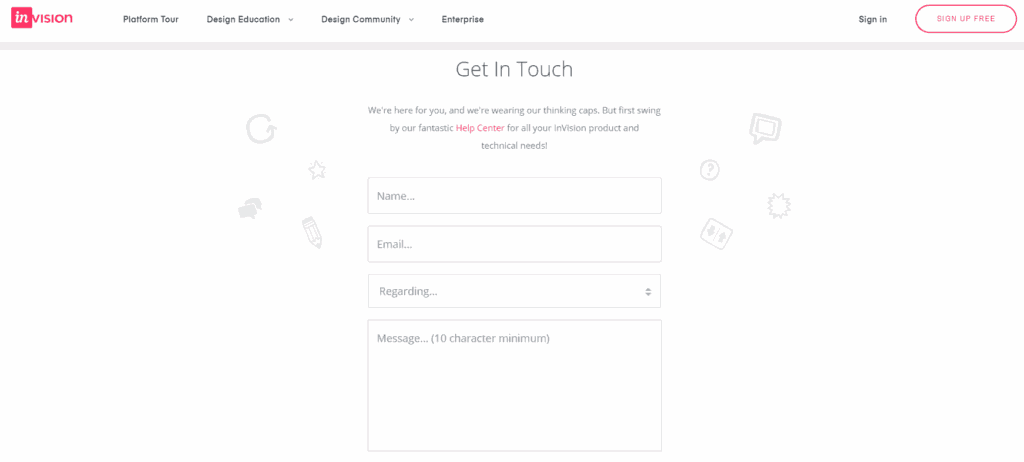
Think about how much time you can save from allowing customers to help themselves by using a FAQ page.
What questions to add on a FAQ page?
Now that you're hopefully convinced to use a FAQ page let's continue to the best part of this article; the dropshipping FAQ page template!
But before that, your goal is to gather all the common questions your customers have asked you or your customer support team before and add them to a document, so you got some questions specific to your business already. Awesome, right?
If you didn't receive any questions yet or if you don't have any customers yet, then no worries, keep reading below!
I will start with some common tips for creating your FAQ page:
- Update it constantly. Keep looking at all the questions that you get from your potential and current customers. Are there any common patterns? Can you include any of these questions to your FAQ page? Don't forget to update old questions and answers as well.
- Keep it short. Write short and precise questions with answers. This way, it's easier to read through it all. You can even categorize your questions to organize your questions related to specific topics. For example, "Shipping & Delivery", "My Existing Order", and so on.
- Add links to other pages. This is a great tip if you can't make the answer or the question short. You can link to other pages in your store. For example, if you explained a lot about how your refunds work in your "Refund Policy", then you can link to there.
Now, I suggest you check out the FAQ page from ColourPop.

I hope you got some inspiration now already, let's continue with the template!
Dropshipping FAQ page template
- What methods of payment do you accept? For example, PayPal and all major credit cards. You could also type something about Gift cards. Maybe you only want to accept Gift cards that are issued by your dropshipping store?
- What if I need to modify my order? If you would like to add items to your existing order, please place an additional order. We do not store your payment information, so we cannot change the order.
- How do I cancel my order? You can answer this with "orders cannot be canceled after they are placed", or you can give your customers a time window of like 24 hours that they can cancel their order.
- Do you provide tracking information? Yes, we will send you a tracking number via email once your order ships. If you haven't received tracking info within 5 days, then please contact us.
- I ordered multiple items but only received one. Where is the rest of my order? We work with multiple global partners, so it can happen that your items are shipped separately; this is to speed up delivery. Don't worry, you will get the items that you ordered.
And don't forget to add something about customs duties or import duties.
Like this example here:

But what about the questions related to shipping?
You will also have to add something about shipping. You can either place all the shipping information on your FAQ page or you can create a Shipping Policy.
This will then contain all the information and questions regarding shipping.

Don't forget to link some were in your FAQ page to your shipping policy, for example:
When will I receive my order? You can check out our Shipping Policy here for all the latest information regarding shipping.
How to create a FAQ page?
Now you know why a FAQ page is important for dropshipping stores, and you saw which questions you can include, but how to create a FAQ page?
Do you need to create a separate page and do some coding?
Well, you can easily add a FAQ page to your store by using an app or service. Below you will find some options for both Shopify users and non-Shopify users.
How to create a FAQ page for free in Shopify?
If you're looking for a free way to add a FAQ page to your Shopify store, then a great free app is called HelpCenter.

This app is free to use and will make your FAQ page easy to read, and it will make it easy for your store visitors to find answers to their questions.
You can learn more about HelpCenter by visiting their demo store here!
Other options to create a FAQ page for your dropshipping store
If you currently don't use Shopify or if you're looking for a solution with way more features for your customer service, then take a look at the apps below.
I will also show you a dropshipping store that currently uses that app so that you can see an example!
1. Zendesk

The first one you can look at is Zendesk. You can see it in action on the store ColourPop:
2. HelpDocs

And the second one is called HelpDocs. You can see it in action on the dropshipping store Inspire Uplift:

You can learn more about this dropshipping store here.
Ecommerce FAQ page examples

If you want to see more FAQ page examples now, then this article will be perfect for you!
In this article, I will go over 12 FAQ pages from different ecommerce stores like Manscaped, MVMT Watches, and Gymshark.
I even included where you should place your FAQ page. Is it in your footer menu, your main menu at the top, or both?
Curious now? Then click on the link below:
12 Great Ecommerce FAQ Page Examples | Inspiration
How to have great customer service when you are dropshipping?
If you're interested in learning more about giving great customer service, even when you're dropshipping, then I suggest reading my other article here.
Look, customer service is important to keep your customers loyal to your dropshipping store. It will even help you with getting fewer refund requests.
Customer service can literally make or break your business:

If you're interested in learning how to prevent getting a 1-star review page like that, then click below:
Customer Service for Dropshipping Stores - Complete Guide!
Action plan helper
Turn this guide into a simple checklist
Open this article in ChatGPT and get the next steps for your dropshipping store.
Prefer another tool?
Conclusion
Did you know a FAQ page is so important for a dropshipping store? If you didn't before, then I hope this article made you realize that creating one for your store has a lot of benefits. Plus, it can save you some time for your customer service. Who doesn't want that?
I also hope that the FAQ template questions were easy to understand and easy to copy for your own store. Just don't forget to give to put it a bit into your own words with your brand voice.
If you got any more FAQ questions for the template or if you have any other questions, then let me know by commenting below or contacting me directly by pressing the "Contact Us" button at the top!
Also, let me know if you already had a FAQ page on your store or not.
Good luck with everything you're going to do, and don't forget, dropshipping is a real business and not a get-rich-quick method!
Free checklist
Review your store before you scaleGetting traffic but not enough sales? Use this store review checklist to spot trust issues, weak product pages, and conversion blockers.
- Check the trust signals that make visitors feel safer buying from you.
- Review your product pages, checkout, reviews, speed, and store layout.
- Find quick fixes before spending more money on ads or new products.
Includes 68+ improvements to help you audit your store step by step.
Want to learn more about dropshipping?
Ready to move your dropshipping store to the next level? Check out the articles below:
- Shopify Track Your Order Page: How to Create One & Why?
- 9 About Us Page Examples for Ecommerce Stores (+ 5 Tips)
- 10 Standard Pages for a Shopify Store & How to Create Them
Plus, don't forget to check out our in-depth guide on how to start dropshipping here!


